
Beyond the API: A Data Engineer’s Guide to the LLM “Memory Ladder”
What happens when your 8B model fine-tuning run crashes immediately, and how to scale your traditional engineering discipline down to the metal?
For the past stretch of my career, I’ve been building with AI — but always at the application layer.
I was exploring Agents in Snowflake Cortex, building automation workflows in n8n, and wiring LLM integrations together with LangChain. My job was to orchestrate them, feed them context, and connect them to data pipelines. I was, in effect, a confident, heavy user of other people’s models.
But at some point, that stopped being enough. I wanted to understand the layer underneath the API call. So, half-seriously, I set out to “build my own LLM.”
That ambition lasted about sixty seconds.
My first real fine-tuning run failed almost immediately with a catastrophic CUDA out of memory error before training had even meaningfully started. I had an 8-billion-parameter model, a dataset, a GPU, and a plan — and the plan was wrong.
What I learned over the following weeks wasn’t how to conjure a model out of thin air. It was something far more useful: the craft of adapting a large model efficiently, and the chain of trade-offs that decides whether a model will actually run on the hardware in front of you. For someone whose day job centers on data platforms — the pipelines, warehouses, and plumbing that AI quietly runs on — it turned out to be as much a homecoming as a stretch. Here is the journey.
Why You Can’t Just “Train” an 8B Model
My naive mental model was simple: load the model, point it at the data, and run the training loop. That works fine for the toy models most of us cut our teeth on. It does not work for an 8B-parameter model on consumer hardware.
The bottleneck is VRAM (Video RAM). Full fine-tuning doesn’t just hold the model’s weights in GPU memory; it also has to store:
- A gradient for every single parameter
- The optimiser’s internal states (like momentum and variance)
- Activations generated during the forward pass
Add it all up, and the memory you need is several times the actual size of the model weights alone. A free-tier T4 GPU, with its 16GB of VRAM, doesn’t even come close.
***The Tempting Trap:*Your first instinct is to shrink things —lower the batch size, shorten the sequence length. I tried that. It buys you a little headroom, but it’s a bad trade. You are degrading how much context the model sees at once and how well it learns just to fit into memory. And in my case, itstillfailed.
The honest conclusion is uncomfortable: to fully fine-tune a model this size, you need massive, multi-GPU cloud clusters. And that means real, enterprise-level cost.
That is the wall. The rest of this article is the exact set of techniques I used to get around it — and what each one costs you.
LoRA: Changing the Math Instead of the Hardware
The technique that changed the equation for me is LoRA (Low-Rank Adaptation), which belongs to the PEFT (Parameter-Efficient Fine-Tuning) family.
The core idea is almost cheeky: Instead of updating all 8 billion parameters, you freeze the original model entirely and inject small, trainable matrices alongside the existing layers. Only those small matrices learn.
Because they are tiny relative to the full model, the gradients and optimizer states shrink dramatically. Suddenly, fine-tuning fits on hardware that could never handle a full training run.
How small? In one of my runs on an 8B model, the trainer reported 83.9 million trainable parameters out of 8.1 billion — almost exactly 1%. You move 1% of the weights and leave the other 99% frozen.
Three core hyper parameters shape how LoRA behaves, and they are worth understanding rather than copying blindly from GitHub repositories:
- Rank (r): Controls the capacity of the adapter (how much the model can actually change). Higher rank means more expressive adaptation, but more parameters to train.
- Alpha: A scaling factor that balances the influence of the newly learned weights against the original frozen model.
- Dropout: Standard regularization to prevent your adapter from overfitting your specific dataset.
Axolotl: Training as a Config File
For the hands-on work, I used Axolotl, an open-source framework that wraps the messy training stack — transformers, peft, bitsandbytes, and accelerate — behind a single declarative configuration.
This mattered to me more than I expected, and for a deeply data-engineering reason: With Axolotl, you don’t write a training loop. You write a YAML file. The entire run — base model, dataset schema, prompt format, LoRA settings, numerical precision, and hardware optimizations — is declared, not coded.
If you’ve ever written a dbt project or an Airflow DAG, this is home turf. The training job becomes just another artifact you can review, diff, and put in version control. Two massive benefits follow:
- Strict Reproducibility: I installed Axolotl pinned to an exact Git commit — not just the “latest” master branch — so the run was entirely consistent. Pinning dependencies to avoid silent breakage is ordinary discipline in data engineering; it’s just as vital here.
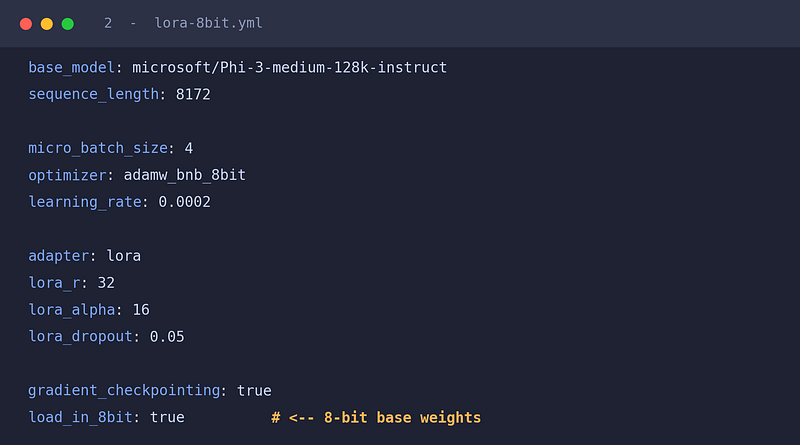
- Cheap Experimentation: Swapping a technique is a one-line change. Changing
adapter: loratoadapter: qloraor togglingload_in_8bit: trueallows you to jump configurations instantly. This flexibility is what allowed me to climb the "memory ladder" below.
My first successful run fine-tuned Meta-Llama-3.1-8B-Instruct on a storyteller dataset. Even with LoRA, it required roughly 20GB of VRAM — meaning an L4 or A100 GPU, not the free tier. LoRA lowers the bar significantly, but it doesn't make it disappear entirely.
Pushing Further: The Memory Ladder
Getting that first run working answered one question (Can I fine-tune at all?) and raised the next: How far can I push this? As I worked through more specialized techniques, I stopped seeing them as separate tricks and started seeing them as rungs on a single ladder. Each rung buys back memory in a different way, and each charges a specific price.
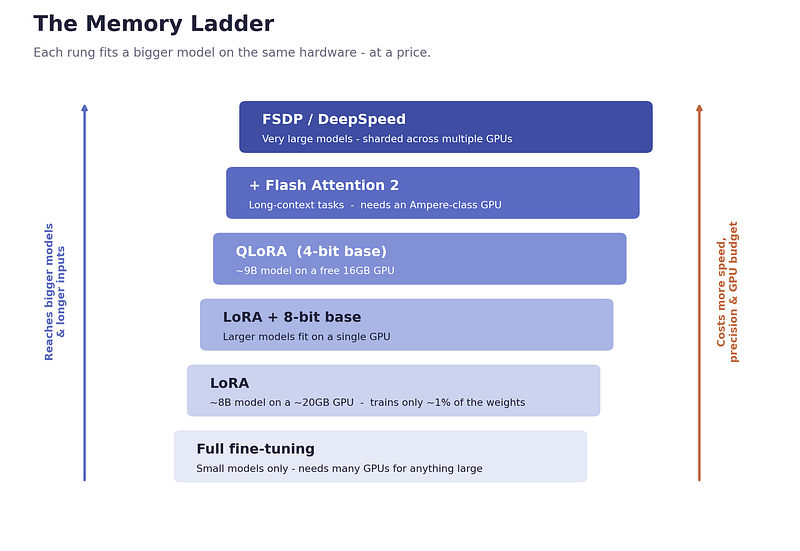
The LLM Memory Ladder — balancing model size against hardware costs.
1. Quantization (Trading Precision for Room)
A 14B parameter model’s weights alone take up roughly 30GB of memory; they won’t even load on most accessible GPUs at full precision. The lever here is numerical precision. By loading the weights at 8-bit or 4-bit instead of 16-bit, you halve (and halve again) the memory the model occupies.
QLoRA ties this to LoRA: keep the frozen base model in 4-bit, and train the tiny LoRA adapters on top. With QLoRA, a 9B model that wouldn’t otherwise come close suddenly fits on a free-tier T4.
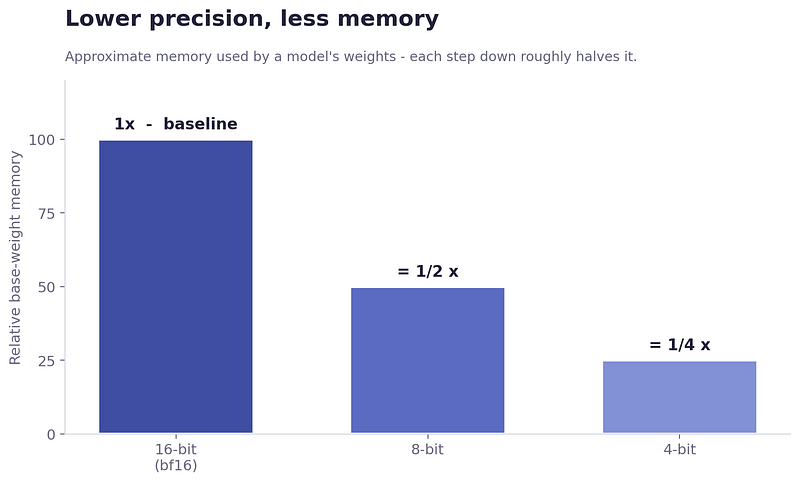
Relative base-weight memory consumption across different bit precisions
- The Price: Lower precision can occasionally degrade output quality, and training runs slightly slower due to the on-the-fly dequantization work.
2. Flash Attention 2 (The Other Half of the Budget)
It’s tempting to treat memory as purely a function of model size. It isn’t. The input context costs memory too, and the cost of attention grows sharply with sequence length. Flash Attention 2 mathematically reorganizes that computation to handle long inputs far more efficiently — essential the moment you care about long-context tasks.
- The Price: It requires modern hardware (Ampere-class GPUs like the A100, L4, or newer).
3. Task-Focused Training (The Data Engineering Play)
This lesson had nothing to do with GPUs and everything to do with clean data preparation. By setting train_on_inputs: false, you tell the trainer to learn only from the target response, ignoring the prompt and context headers.
- The Price: You spend a bit more time engineering your dataset upfront, but you don’t waste the model’s limited capacity teaching it to echo your own prompts.
4. DeepSpeed & FSDP (When One GPU Fails)
When a model is simply too massive for a single card, you have to shard it. FSDP (Fully Sharded Data Parallel) and DeepSpeed split the parameters, gradients, and optimizer states across multiple GPUs.
- The Price: It assumes a multi-GPU infrastructure, introducing orchestration complexity and a much higher financial budget.
The Configs, Side by Side
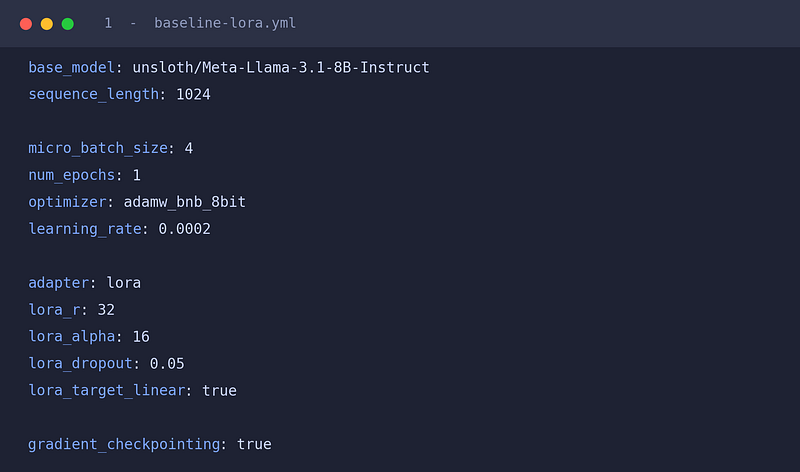
Because Axolotl makes the whole run a config file, the difference between these techniques is visible as a handful of changed lines. Moving from “needs an A100” to “fits on a free T4” is, in Axolotl terms, just three or four edited lines.
- Baseline LoRA (Fits a mid-size model on a rented GPU)
2. LoRA + 8-bit Loading (Same idea, larger model, half the base-weight memory. Note the single added line at the bottom.)
3. QLoRA (4-bit) + Flash Attention 2 (The most aggressive setup, for a 27B-class model.)
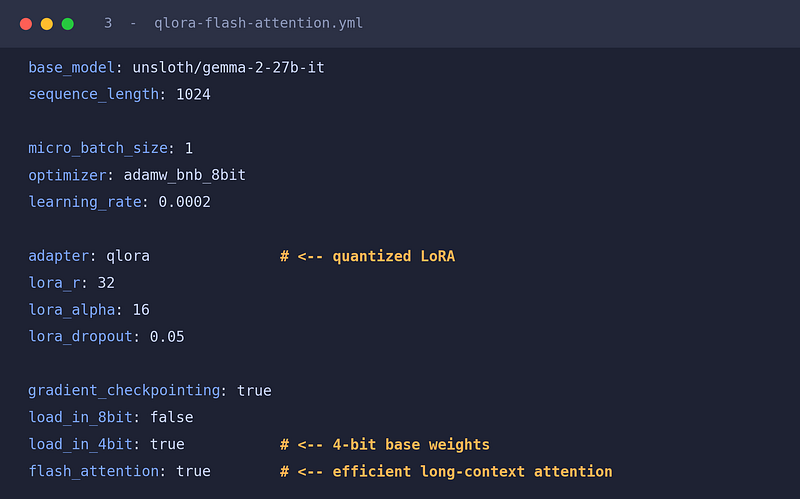
The Ultimate Fine-Tuning Trade-Off Matrix
No optimisation technique comes for free. This is the mental model I built to map out architectural decisions:
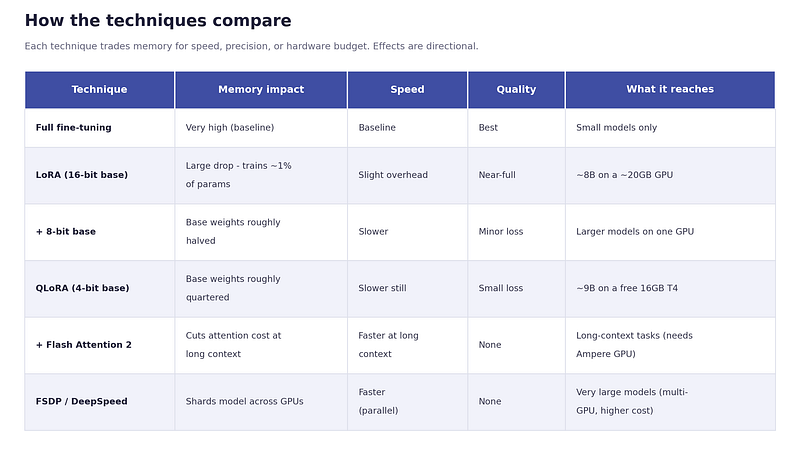
Detailed comparison matrix of optimization techniques and their architectural costs.
Merging, Validating, and the “Data Quality” Mindset
LoRA produces an isolated adapter file. To actually use it in production, you mechanically merge those newly learned layers back into the base weights.
But the step that gets skipped far too often is evaluation.
After merging, I ran the model through a text-generation pipeline to inspect the outputs. Reading the generations and auditing them isn’t a formality — it is the LLM equivalent of a data quality check. I wouldn’t trust a data pipeline without validating its output schemas, so I absolutely shouldn’t trust a fine-tuned model without inspecting its generations. A training run that finishes with zero errors is not proof of a successful model. Evaluation is simply data quality, reframed.
The Takeaway
Stepping away from the application layer taught me a few fundamental truths:
- Everything is a memory trade-off in disguise. Most architectural decisions in AI engineering come down to a physical hardware constraint.
- The config is the architecture. Tools like Axolotl move the heavy lifting out of fragile code and into declarative configurations. Moving a model from “expensive cloud cluster” to “commodity hardware” is often just three or four lines of YAML.
- Engineering discipline transfers perfectly. Config-as-code, pinned commits, deliberate data scoping, and rigid output validation are standard data engineering principles. They apply just as heavily to AI models as they do to data pipelines.
I started this experiment wanting to build an LLM from scratch. I didn’t. But I came away understanding the model layer the way I understand a data platform: as a system of constraints, physical limits, and deliberate engineering choices.
Now, when I build agentic workflows or application-layer integrations, those token limits and latency metrics aren’t abstractions anymore — they’re guardrails I design around with a lot more respect.
What’s Next?
Squeezing a model onto the hardware actually in front of you is only half the battle. The harder, more interesting problem is serving it reliably in production.