
Anatomy of a LangChain Application: The Core Components Explained
After seeing the big picture of the LangChain ecosystem, you might be asking, “So, how do I actually build something with it?” The best way to answer that is by walking through one of the most powerful and common applications you can create: a Retrieval-Augmented Generation (RAG) app.
What is a RAG Application?
At its core, RAG turns a generic AI into a subject matter expert on your private data. In simple terms, RAG allows you to build a “Question & Answer” application over your own private data.
Imagine you have thousands of PDF documents — be it company reports, research papers, or legal contracts. A RAG application would allow a user to ask a question in plain English, and the application would find the relevant information within those PDFs to generate a precise, context-aware answer.
This process of “chatting with your documents” is a cornerstone of enterprise GenAI, and LangChain provides all the necessary building blocks to create it. Let’s break down the entire pipeline, step-by-step, to understand the core LangChain components involved.
The entire process can be divided into two main phases:
- Phase 1: Data Indexing — Preparing your knowledge base.
- Phase 2: Retrieval & Generation — Answering questions using that knowledge.
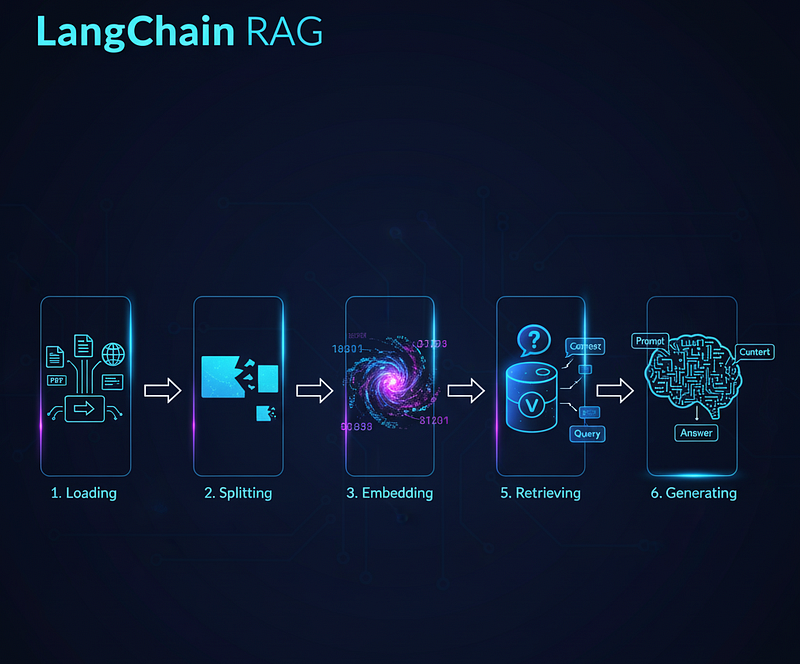
Phase 1: Building the AI’s Brain (Indexing Your Knowledge)
Before an AI can provide answers, it first needs to do its homework. This preparation phase is where we build its knowledge base.
Step 1: Data Ingestion (Loading)
Naturally, it all starts with the data. The first step is to load our data. LangChain’s data ingestion is incredibly versatile, supporting a wide range of data sources through its extensive library of Document Loaders. Think of LangChain’s Document Loaders as the universal adapter for data. They are incredibly versatile, allowing you to load information from almost anywhere:
You can load data from:
- PDF files
- Excel spreadsheets or CSVs
- JSON files
- Website URLs
- Images and Videos
- And many more…
This component ensures that no matter where your data lives, you can bring it into the LangChain framework.
Step 2: Data Transformation (Splitting)
Just like us, an LLM has a limited attention span (its ‘context window’). Once loaded, a large document (like a 100-page PDF) is too big to fit into an LLM’s context window. An LLM has a limit on the amount of text it can process at one time.
To solve this, we use Text Splitters. Their job is to act like a smart editor, breaking down the content into smaller, digestible, and semantically meaningful “chunks.” This is a crucial step to optimize the data for the AI to process effectively.
Step 3: Text Embedding
Now that we have our text chunks, we need to convert them into a format that a machine can understand for similarity comparisons. This is where Text Embeddings come in.
An embedding model takes a piece of text and converts it into a numerical vector — a long list of numbers. The magic of embeddings is that semantically similar texts will have mathematically similar vectors. This allows us to find relevant chunks of text by comparing their vector representations.
LangChain integrates with numerous embedding providers, including:
- OpenAI Embeddings
- Open-source models from Hugging Face
- Google Gemini Embeddings
This step is what enables the “retrieval” part of RAG.
Step 4: Vector Storage
Now that we have these unique ‘map coordinates’ for our data, we need a special place to store them. . We can’t just keep them in a local file. For this, we use a specialized database called a Vector Store (or Vector Database).
These databases are optimized for performing incredibly fast similarity searches on millions of vectors. LangChain supports a wide array of vector stores, including:
- FAISS: A highly efficient local similarity search library.
- ChromaDB: A popular open-source vector database.
- AstraDB: A scalable, cloud-native vector database.
Once this phase is complete, our knowledge is indexed and ready to be queried.
Phase 2: Retrieval & Generation (The Conversation)
With our AI’s “brain” built and indexed, we can now start having an intelligent conversation.
Step 5: Retrieval
Now when a user asks a question, we don’t send the entire database to the LLM. Instead, we use the user’s query to find the most relevant information from our Vector Store. This is the Retrieval step.
- The user’s question is first converted into an embedding (a vector) using the same model .
- This query vector is then used to perform a similarity search in our Vector Store.
- The store returns the most similar text chunks from our original documents. This retrieved information is our “context.”
In LangChain, this entire workflow is often managed by a Retrieval Chain, an interface designed specifically for querying a vector store and returning relevant documents.
Step 6: Generation
This is the grand finale. , we have all the pieces needed to generate an answer. We combine:
- The Prompt: We use a Prompt Template to instruct the LLM on how it should behave (e.g., “You are an AI research assistant. Answer the user’s question based only on the provided context.”).
- The Context: The relevant text chunks retrieved in the previous step.
- The User’s Question: The original query from the user.
This complete package is sent to the LLM. The model then uses the provided context to formulate a factually grounded and accurate answer to the user’s question. This is the Generation step that completes the RAG pipeline.
What’s Next?
These six components — Loading, Splitting, Embedding, Storing, Retrieving, and Generating — are the fundamental building blocks you will encounter in almost every LangChain project.
Now that you understand the blueprint, the real fun can begin: writing the code.In the upcoming articles in this series, we will dive into the code and implement each of these steps in practice. We’ll see exactly how to load different data types, choose the right text splitter, use various embedding models, and ultimately build some amazing projects. Stay tuned!